Compact Stick COMPUTERS for the today's Generation

Compact Stick COMPUTERS for the today's Generation

Laptops and desktops almost behave as a tool in our business days. So it has become so difficult for businessmen to leave laptops or computers now. But the problem exists regarding displacement. In case of a desktop it is very difficult to transfer the whole setup to somewhere else for use. So due to the evolution of technology Laptop came into existence. Laptops served the purpose of being carried to any place we required or anywhere of our choice. As laptops run on a battery power supply set up was of no issue. Once you recharge the laptop it allows a minimum of 3 hrs to work on it. But as the time has passed and now the demand of nanotech has come into role and man is in need of more optimization, the new computer or laptop have got a new look like a dongle. Let’s think of something if it was possible that a 6 inch device would perform the work of a laptop. Yes, the time has come now. Google Chromebit is a device of around 6-7 inches in length and having a look like a dongle which will be equal to a desktop or a laptop.
The Chrombit is or may b called as a mini CPU which can run getting power from the HDMI port of a LED display or so called as LED TV. It already has the configuration of a usual CPU of a computer except for the displaying unit. So all you need to do is plug it into the HDMI port of a displaying unit or TV and you get the windows ready for use. It gets its power from the TV itself. It has an inbuilt memory or so called as hard drive for the Operating System to be installed. It has a wireless connectivity unit for the connection of mouse and the keyboard.

What is Google Chrombit Exactly?

Let me explain about what it is exactly. Chromebit: it is a new Chrome device manufactured or produced by Asus syncing with the ideas of Google. The size is no way more than a candy bar, but it is equivalent to a full-size configured PC from technological point of view.
What you need to do is, just plug in this device to any display unit having an HDMI port and the total setup gets converted into a computer. For school or business purposes it is a highly upgraded set up from a full-time regular PC.


Device Specifications:
Google Chromebit is equipped with:

-          3288 quad-core Rockchip Cortex A-17 processor
-          760 GPU ARM
-          A 2 GB RAM
-          16GB of memory storage
-          Bluetooth 4.0
-          Smart ready controller
-          Wi-Fi 802.11
-          AC support and
-          USB port

From the above mentioned configuration you can now understand its potential, which fits in the power of a fully fledged PC in its mini size.


Advantages of Google Chromebit over usual Laptops:
-          Talking about as usual daily life we carry our bulky heavy laptop to work every day and even carry it while traveling for work related appointments and etc. Just imagine, if small dongle sized equipment could serve the purpose of the laptop. It’s damn sure that our life would get much more comfort. And that’s the purpose served by Chrombit.

-          Working on a Tablet is not equal to windows since many of the business related works cannot be accomplished with it. But surely a Chromebit allows you an equal interface as that of Windows and allows you to complete all your business works right there providing some rest to your laptop.

-          Two reliable companies Google and Asus have manufactured the device getting their ideas into this one gadget. It is priced at just around 100 USD. This unique gadget can convert any TV into a full-screen computer.

-          You just need to plug the device into the HDMI port of a displaying unit or a LED TV. All you need to do after your travel is check in and then plug in the dongle to the TV set. Now you can get access to internet instantly and you can access all the important files and folders that are saved in your PC.

-          If you have a presentation for any upcoming meeting it becomes more stylish. Instead of carrying a laptop or pen drives all you carry along is this dongle that is your whole computer. Powerpoint presentation saved in your PC can be easily be transferred and stored in Chromebit or directly you can make a presentation with the chromebit because it also has a window loaded.

-          The size is too compact that it just occupies the space of a pen drive.

-          No extra skill is required to operate it. If you know to operate your PC, it’s just more than enough.
This device can also be utilized in the sector of education, for schools or interior hospitals where finding a computer or setting up a desktop at the mean time is almost difficult.

                                         Buy it here


Along the development of this device I-ball also has launched I-Ball Splendo Stick. I-Ball in partnership with Microsoft India has launched its first PC-on-a-stick device. It also serves the same purpose, just the names are different. The operations are all same.


It’s specifications are:

-         Can fit in a pocket
-         Powered by an Intel Atom quad-core processor
-         Windows 8.1. built in
-         2GB of RAM
-         32GB of inbuilt storage
-         HD graphics
-         Multi-channel digital audio out port
-         A micro-SD card slot
-         regular USB port
-         Micro-USB port
-         Wi-Fi and Bluetooth 4.0


The device has a fan-less design and comes with a one-year warranty from the company.

At last but not the least I would like to say that these products are really going to prove high. I would say that these are the perfect alternate for a PC and for a PC user.

                                                            Buy it here


Read More

11 Best Free Call Recorders for Android Phones (2016)

11 Best Free Call Recorders for Android Phones (2016)


Recording tapes (Audio and video) were only portrayed in TV cinemas and were never in our hands. But as the technology advanced and we are now in the 21st century this is not a big deal now. We can use recording tapes as evidence or just for fun among friends over a talk long back. Just think of a situation that some of your friends had a conference over the phone and bashed for nearly 2 hrs or more and just went on cracking jokes and all, you being absent. If any of your friends had the recorder it would have been amazing, because you would have finally not missed it. You would have asked your friend to share the recorded file with you and you would have enjoyed the conversation later on. So this has now become very simple for Smartphone users. Never worry we have brought you many ideas to sort out your issues about this particular theme. ‘Call recorders’ are the apps which will provide you the facility to record phone calls while you are talking over the phone with anyone. There are number apps which provide you the option of recording calls but the listed apps are most efficient on the specific features.

Call Recorder:

This recorder is the most downloaded app from the play store. It provides a number features and easy to use application. It has a cool user interface. You can record calls of your own choice (i.e. depends on you which one you want and which not). You can even record by type (i.e. Incoming, outgoing or all or none). It also provides a facility to record in a specified format of sound (3gp, amr, mpg). The mpg format provides the highest clarity sound. You can also specify a delay time after which the recording would start. Also you can stop the recording from calling screen itself. Over all it’s a nice app for recording calls without any difficulty rather is an user friendly one.

      Get it here


Automatic Call Recorder:

This is a phone call recording app for recording calls of your own choice. Record calls on your own choice depending on your priorities and will. This app has also integration with google drive and drop box so that you can store the recorded files in the cloud. It also allows you to search the files by phone numbers even. And you can also sort it according to your will (i.e. dates, time, etc.). There are three options to filter recordings:
Record all: records all calls including outging and incoming calls.
Ignore all: ignores all calls i.e. does not record the calls.
Ignore list: records the calls of contacts which are not included in the ignore list.


RMC Call Recorder:

RMC is Record My Call. This recorder can record both incoming and outgoing calls. It has a movable manual record button which can moved and placed anywhere on the screen. It also possesses a filtering options based on saved contacts and unknown numbers. You can even show/hide recording notification from the screen. It supports many format recordings like- mp3, amr, mp4, 3gp and wav. It also has a so called vault in which you can provide a password for the safety of your recorded files.


Easy Voice Recorder:

This is an easy recording tool for tapping phone calls. It is also very simple for use. It is also capable of recording audios as well as calls. You can even use it to record any meetings, discussions, lectures and etc. without any restricted time limit. It allows you to record in high quality PCM and AAC format also you can use the amr format record if you do have an issue regarding file sizes. You can even backup this recorded files to you PC or any other memory chip or pendrive.
                                                              
      Get it here


 Tap A Call:

This tool is mainly preferred by professionals. This is a recording app which was first developed for use in iPhone but now it’s available for Android too. It records in high quality crystal clear sounds and does not have a problem like putting the phone into loudspeaker or something. The working of this app is slightly different like- first you need to call to the recording line of this app then you can create a call to a person and put him in conference or simply you can say as make a conference call. It also has the feature of cloud storage so that the risk of loosing the recordings is next to impossible without your permission. The only demerit is that you can record and install the app for free but you will have to pay some charges to listen to the recordings.

      Get it here


Super Call Recorder:
Super call recorder records real time phone calls with a high clarity sound. It by default records the sound of both the sides. It is completely free to install and is compatible with almost all models and android versions. It also has a built-in playback system so that you can listen to the recordings from it. It records in mp3 format.
                                                  
      Get it here


All Call Recorder:

This is something called as simple and efficient call recording solution for your Android. It records your phone calls from both the sides and telephone conversations are recorded in 3gp format. It also provides you to save your recorded files any where possible including cloud storage. The free version pops up with ads but the paid version is not so. For options menu you need to long tap on the recorded files.  

       Get it here


Phone Call Recorder:

Phone call recorder records both unlimited incoming and outgoing calls from you phone. You can even share recordings or add to favorite. It also provides a feature of password protect so that no one other than you can listen the recordings or as can say as your personal recordings. In addition to all these it also provides a blacklist where you can block calls which are annoying or fraud in your sence.


Call Recorder- Automatic:

Auto call recorder allows you to record call while you are on the call. It records any phone call you want according to your choice i.e. allows you to choose which users or incoming\outgoing phone calls to record and choose which calls you want to save or share or more of your need. It records your calls as in autopilot mode. You can sort the recordings by using the filters available like by dates, groups or names.


Smart Call Recorder:

This is very simple and easy to use call recording tool. No customization is required in this app. It does its work by its own. The only thing u need to do is switch it ON. And the rest work is what it does. You can change the format of recording if you want. It keeps long records i.e. a record of six months. It is also equipped with security systems for safe guarding your recordings.


Auto Call Recording 2016: (ACR)

This is something called as a New Year gift to the android users that to for free. ACR enables you to record ongoing calls very clearly and effectively that is both side recordings. No time limit for recordings and per recordings. It even prompts a message whether you want to keep the recorded files or not, so that you can only keep the files of your own choice or selection. If the conversation was not so important you need not keep the records.

    Get it here

All the apps provided here are all free to download. Premium or pro versions may cost u some penny.

Read More

Windows 10 for Windows Phones

Windows 10 for Windows Phones

‘Operating Systems’

The word itself means a system which operates something. Moreover most of the electronic devices today run through some softwares. That’s nothing but called as an operating system. Simply, can be considered as a software which runs the device or commands the device. So let’s now talk about operating systems installed in the most evolved and friendly devices i.e. cell phones or so called as now days as Smart phones. Smart phones today run on three platforms or as through three operating systems- Android, iOS and Windows. So I am going to focus on the Windows and forward some ideas about it. It’s known to everyone that Windows was introduced by Microsoft and NOKIA introduced it in its Smart phones. NOKIA had launched a series as LUMIA which ran on the Windows. However now it is owned by Microsoft. And the latest launch of windows is the Windows 10 for PCs and Smart phones too.

Being an IT professional, your first concern would probably be about compatibility of Microsoft Windows 10 on desktops and laptops. But the Windows 10 OS is designed in a way that it can not only run on more than just PCs but phones and tabs too. Windows 10 available for Smartphone is Windows 10 Mobile. The version of Windows 10 that runs on mobile devices is built on the same core code as Windows 10 for desktop PCs, and is capable of running the same universal apps, delivered through the same Windows Store. The first public release of Windows 10 for phones was in February 2015, with only a few models of phones supported. But an updated release in April extended its compatibility with much more models leading to a much larger device population but is still however far from complete. In April, Microsoft also released several Microsoft Office apps—Word, Excel, PowerPoint, and One Note—for use on mobile devices. You can install the Windows 10 Technical Preview which is available for devices like the Lumia series, which has a 6-inch+ screen and can easily act like a tablet. (In fact, phones with extra-large screens are generally referred as “phablets” because of their ability to shift roles between phone and tablet.)


Windows Phone 8, for example, was the first version to be based on the Windows NT kernel used in the PCs. And now evolving into the modern market Microsoft has built a better operating system for both PCs and Smartphone. For the first time Microsoft has announced free upgrade to Windows 10 for windows 8 and 8.1 users. Some models may not support now but later on that will be sorted out as sources say.


Installing it:

There are some general requirements for your phone to get upgraded:
-          Your phone should have 8GB of internal storage
-          It should have Windows 8.1 running.

Any ways other requirements and the list of supported models of phones to get upgraded are present in the link provided:

    For other related information Click here.

Now you need to get ‘windows insider’ app from the windows store and get it installed on your phone. Sign in using the same Microsoft account which you have used in your Store. Then tap on ‘Get Preview Builds’. 


Then choose one of the options from the available options (i.e. insider slow & insider fast) on the screen depending on your phone. To find out which category your phone belongs to tap on the ‘Options’ (i.e. three dots at the right bottom of screen), then tap on ‘About’. And then follow the installing guides on your screen.


NOTE:
    In case you want your previous Operating system back or just say as to revert back your phone, get ‘Windows Phone Recovery Tool’ from http://go.microsoft.com/fwlink/p/?LinkId=522381 . This requires a USB connection to the phone; the utility software identifies the phone, downloads the current operating-system image for the device, and then replaces the preview version with the downloaded version.


Windows 10:

   What’s in Windows 10 ?
-         Better looks
-         Better presentation styles
-         Better software user interface
-         Enhanced battery life
-         Strategic grouping
-         Speed optimized
-         Optimized User Interface

Having a row of status icons at the top of the screen, isn’t necessary on larger devices but is crucial on a phone, for quickly checking cellular network, recent notifications like new messages, changing network mode, altering brightness, turning ON Bluetooth and Wi-fi and remaining battery life.

These are some screenshots of the windows 10:


The Settings app, shown in the screenshot, resembles the iconography. It is similar to what appears in the Settings app on a desktop PC running the Windows 10 Technical Preview, with just a few typical changes.


Similarly, Windows 10 on a mobile device handles notifications in the same way as that of PCs running on Windows 10 —with notifications appearing in a list, categorized by source, and a group of action buttons for quick access to common settings. And this notification panel can be summoned with a downward swipe. Two aspects of these notifications and the panel are of great worth. First, the status of each notification syncs across devices, so if you clear a notification on the notification panel, it’s also marked as read on your mobile desktop. In addition, you can interact with particular notifications directly— like replying to a text message directly from this screen rather than having to open the Messaging app.
Read More

Tips to Get Maximum FACEBOOK 'LIKE'

Tips to Get Maximum FACEBOOK 'LIKE'

We all do know what FACEBOOK is, and it’s operating. No doubt not so deep but a glance is known to everyone like- adding photos, changing profile pictures, updating status, commenting, liking, replying to a comment, tagging and etc. So this are the features of FACEBOOK which are known to a common person or can say as a FACEBOOK user . So let’s now talk about updating status, uploading photos or any activities which are visible to your FACEBOOK friends. Now a condition becomes miserable if your actions do not get any responses (I mean to say ‘LIKES’ or ‘COMMENTS’). We have found out some effective ways to get your actions noticed and so do responses from your friends. Here we have some tricks and so called tips to do the same.
These methods have been divided into two types- Natural ways & Unnatural ways.
Natural ways includes getting ‘LIKES’ from FACEBOOK itself without doing anything or using the features of FACEBOOK itself. And the unnatural ways include buying ‘LIKES’ form other sites or using some other sites and deploying them to get ‘LIKES’. 

Tagging method (Natural):

This is almost the easiest way to get ’LIKES’. It actually includes Tagging and Retagging. Tagging is possible for your pictures or profile pictures. FACEBOOK allows a maximum tag of 50 i.e. you can tag a maximum of 50 friends of yours in a picture you’ve updated or posted. As you tag a person your uploaded photo remains on the top of his Timeline so that whenever he opens his account he has a vision on it. And as he is a friend of yours, he will surely ‘LIKE’ it. And after that whenever anyone ‘LIKES’ or comments on the photo it again gets to the top of the Timeline of all the 50 friends you have tagged. So after getting around 50 likes just remove the tags and tag another 50 friends. This will fetch another bunch of ‘LIKES’. So gradually tag all of your friends so that you get maximum likes out of your total friends in FACEBOOK.
Now the question is like if you do not like tagging. But for this you however need some ‘LIKES’ and ‘COMMENTS’ to proceed further. As you know that all your activities are notified to your friends, to the every comments you have received on the photo or status go on replying each and every comment with some time interval. This will help you in a way that your friends get notification after regular intervals and they even try to know what is it about and do explore your photo. And the most important at the end of everyday yourself ‘UNLIKE’ the image and again ‘LIKE’ it. This will again bring your photo to the top of Timeline of your friends.

Now let’s talk about getting likes forcefully called as forced ‘LIKES’. Of-Corse these are unnatural ways of snatching ‘LIKES’. Let’s explore some ways.


ADDMEFAST.COM:

This is a credit exchanging site in return of ‘LIKES’. There are many other sites doing the same but the problem is they do not have enough traffic which in turn will make you wait a longer time to get the required amount of ‘LIKES’. AddmeFast.com has heavy traffic and will accomplish your job within a very short time. So what is done is you have to pay to buy points or you will have to earn points. If you buy you will have to pay or else there are some ways to earn also. After you have earned points or bought points you can start the job. All you need to do is:
-          


 * Sign-up in AddmeFast.com
-          * Buy some credit points or you can earn, choice is yours. If you do not want to spent money explore     the site, go on surfing, inviting friends, liking it’s stuffs, etc. This way you will earn some points.
-          * After you have got some points hit the ‘Add Site/Page’ button.
-          * Now here you can add what type of credit you want i.e. Facebook like, page like, etc.
-          * After filling up the details save it.

Now you will see your photo getting large amount of ‘LIKES’ very quickly.

Buying ‘LIKES’:

This is another way of getting ‘LIKES’ or simply called as buying ‘LIKES’. buy-cheap-social.com is a site which sells ‘LIKES’ charging you some amount in return. Here the most advantageous fact is that it provides you ‘LIKES’ from genuine persons present in FACEBOOK. It takes a little bit time to deliver your order but all are genuine. All you need to do is pay the required amount according to their plans available and you get your required stuffs.


Autolikers:

Now this is the most cheat way of getting FACEBOOK ‘LIKES’. From the name itself, it’s clear that something automatically likes our page, photo or status. It’s exactly some peace of Code that requires your FACEBOOK token to exchange likes between people on the same website. There are a lot of such services but only some of them actually work.
Please make sure you are not using it from your real account because exchanging tokens is like exchanging your passwords. And that is the point we have not provided a link to get redirected.

Read More

Cool Gadgets for Smarter Smartphones

Cool Gadgets for Smarter Smartphones
Smart phones have become a very important part in our life. As the use of Smartphone now a days is going on increasing, rather we can say that it’s almost impossible for a person to live without a Smartphone. When we come to business point, it becomes a part of business also. A businessman without a Smartphone will soon get exhausted in the today’s world. So we have found out some cool and funny gadgets for your Smartphone that allows you to drive your Smartphone more efficiently and perform some useful extra functions.

iPhly:


Today in the sector of electronics we have developed to such an extent that most of the appliances or gadgets which are installed at our homes run on an electronic circuit and are controlled by a remote control device. As the number of remote control device increases and due to its small size factor, it gets hidden from our vision many of the times and the result is we don’t get it a required time and end up changing our mood to something else. So now we have found out a device called iPhly, a gadget for your iPhone which will allow you to control your entire remote controlled device to be controlled from a single iPhone or a Smartphone. You can say as a master remote for all of your remote controlled devices. First you need to install it on your phone and then make a an initial setup for your various devices like- TV, Air conditioner, toys and etc. And then you can enjoy it.

MISFIT:


In the world today human is so busy that it somewhat becomes difficult for him to take care of his body or find out required rectification in the body activities. So no need of worrying now, we have found a way to help you up to some extent. We have found out MISFIT for your Smartphone that can track your body activities for the whole day and will show you the details about your body at the end of the day. Then you can take the necessary steps towards improving your body performance. You just need it to be equipped to your body, that’s it.

SQUARE REGISTER:


Now let’s think about receiving cash or fund. It’s been possible either by cash payment or cheque or DD in case of a company or organization. The secret revealed is your Smartphone can help you to receive cash. The only modification required is just installing a gadget on your Smartphone. SQUARE REGISTER helps you receive credit card payment any time anywhere. The debtor needs to swipe his card on the device, sign in with his password and transfer the funds to your account which is linked with the gadget.

LOCKITRON:


Carrying a bunch of keys in your suit pocket becomes irritating. But to lock your home you neeed to lock your door and carry the keys. So we have fetched an easy way for this purpose. LOCKITRON not only lets you unlock the door with just a tap on your smartphone, but also notifies you when someone is knocking at the door. With the right customization, you can even set your door to unlock whenever you get near the door.

HONE:


Did you know that you can trace your keys if they get disappeared? Yes we have found a solution to it. Keys have an ability to get disappeared right when we are searching for them. And it gets us angry when it is the key of a car or our vehicle. HONE helps you to trace your invisible key. The setup is very easy. Like a key ring you just need to tie the device to your key and have it paired with your iPhone. And when your keys get disappeared you just need to tap the ‘Find’ button on your iPhone. The device will light up and produce a sound indicating its position.

POWERUP:


During our childhood we all wanted our paper air plane to fly higher and for a long distance. Finally this has been solved by some engineers. PowerUP 3.0 is a gadget for your iPhone which will help you do what you wanted long back. It is a kit which is to be attached to your papers plane and then done. Now you need to take out your iPhone and the total control is in your hand. Now you can make it fly into the sky.

VAVUUD:


For cyclists, surfers and boaters it is essential for them to find the direction of the winds. Come let me show you your friend VAVUUD. It is a wind meter which needs to be plugged into your Smartphone to measure wind speed and direction. It has a measurement range of 1m/s to 25m/s.

PHOTO LENS:


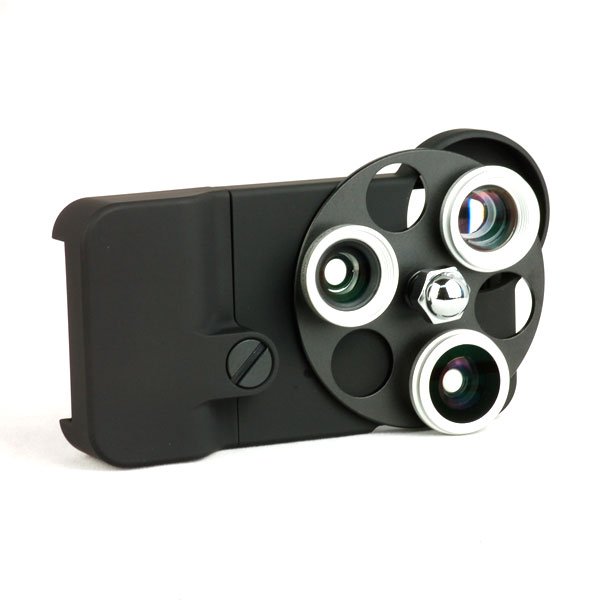
Want to turn your iPhone into somewhat like a professional camera. Then just need to buy this gadget for your iPhone. iPhone PHOTO LENS is a pair of three lenses which allows different modes of photo shoot. Fisheye, wide angle, telephoto are its features. In addition to this it also allows you to shoot in macro mode which is the most essential feature in a photo shoot. It comes in a triangular model so that you can switch over the different lenses without displacing the frame or the hub. You will only need to rotate the lens panel according to your requirements.

GARMIN HUD:


If you have a hard time seeing the tiny letters on a navigation screen while you’re driving, GarminHUD has a solution in the form of HUD, a head-up-display unit that displays the information on the windshield of your car. It not only projects the screen on the windshield but also in a magnified form.

MINI CINEMA:


Want a cinema experience on your iPhone then get a MINI CINEMA for iPhone. It enlarges your screen and amplifies the sound even. No need of electricity or battery power. You just need to place the phone on its deck provided and start the video or movie. It’s quite handy. It can be carried along on the move.

References:

Click here                                                                                                Click here


Read More